STL Mesh Defects, Illustrated: What a Checker Actually Finds
Slicer error messages are terse. "Mesh is not manifold" or "object has open edges" tells you something is wrong without showing you what or where. This page shows every common STL defect the way a mesh checker sees it: a screenshot of the damaged file in our 3D viewer, next to the actual check report it produced. All of the files are from our validation suite, and you can download them from the repair guide to reproduce everything here.
How to read the screenshots: the viewer paints open boundary edges red and non-manifold edges amber, and the badge in the top corner counts both. The chip above it shows the bounding-box dimensions. In the reports, note that volume is marked unreliable whenever the mesh is not a closed solid; the enclosed volume of a broken mesh is not a meaningful number, and a checker that reports it without a warning is guessing.
Holes
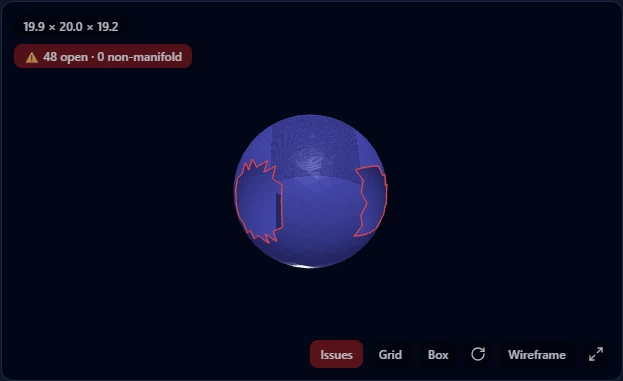
A hole is a region where faces are simply missing, leaving a loop of boundary edges around the gap. Slicers either refuse the file or guess how to close the gap, and their guess is not always the surface you meant. Holes come from interrupted exports, faces deleted during editing, and 3D scans that could not see part of the object. Repair caps each boundary loop with new faces; for a hole in a smooth surface this is safe and predictable.
Flipped Normals
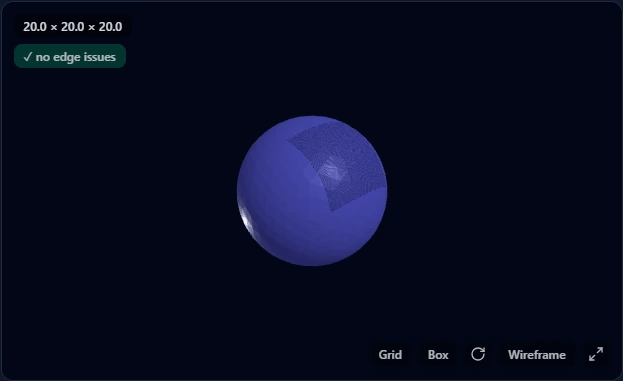
Triangles: 1,280 | Vertices: 642 | Shells: 1
Volume: 1360.402 (unreliable: mesh is not a closed solid)
Issues found:
 - inconsistent face winding (flipped normals)
Verdict: NOT PRINT-READY
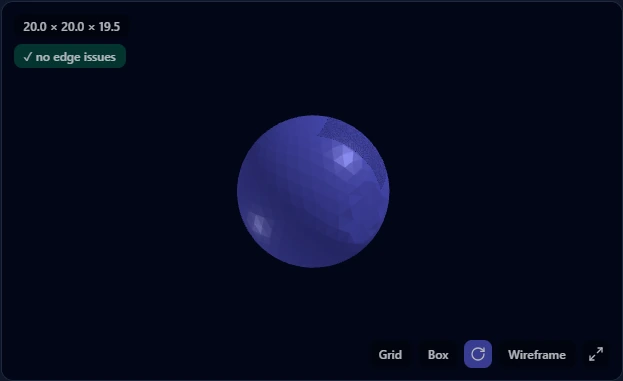
This one is instructive: 30% of the faces point inward, but every edge still connects exactly two faces, so edge highlighting finds nothing and the badge is green. What gives it away visually is the oddly shaded patch, and what catches it reliably is the winding check in the report. The reported volume also collapses to 1360 for a sphere whose true volume is around 4189, because inverted faces subtract. A slicer will print voids where those faces are. Flipped normals come from mirrored geometry and inconsistent boolean results, and repair fixes them by reorienting the winding, which moves nothing.
Non-Manifold Edges
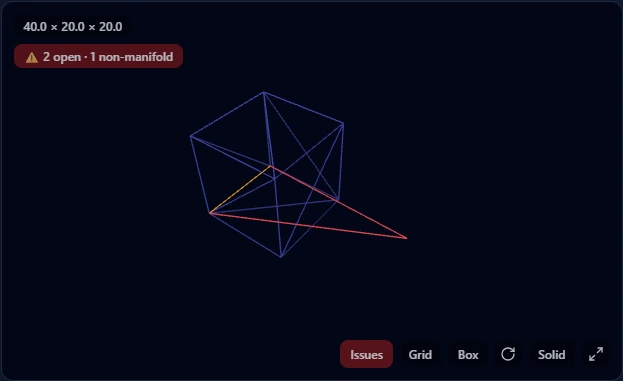
Triangles: 13 | Vertices: 9 | Shells: 2
Issues found:
 - not watertight (2 open boundary edges)
 - 1 non-manifold edges
Verdict: NOT PRINT-READY
Manifold means every edge separates exactly one inside from one outside, which requires exactly two faces per edge. The dangling fin here gives one edge three faces, and the geometry stops making sense as a solid: which side of the fin is inside the part? Boolean operations are the usual source, leaving internal walls or stray faces behind. Repair removes the fin, and the box in this file comes back with its exact original volume.
Duplicate and Degenerate Faces
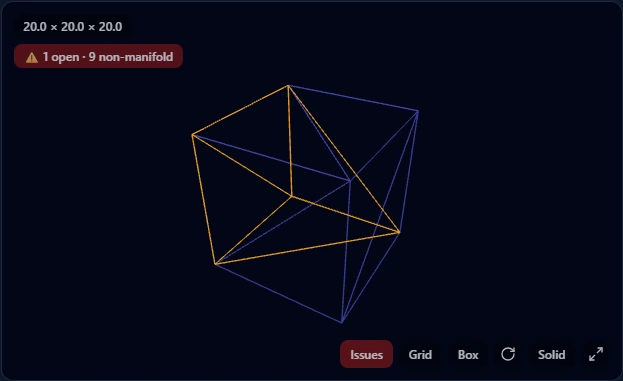
Triangles: 18 | Vertices: 8 | Shells: 11
Volume: 12000.0 (unreliable: mesh is not a closed solid)
Issues found:
 - not watertight (1 open boundary edges)
 - 9 non-manifold edges
 - 4 duplicate faces
 - 2 degenerate (zero-area) faces
Verdict: NOT PRINT-READY
A cube needs 12 triangles; this file has 18. Duplicates sit exactly on top of existing faces, instantly making every edge they touch non-manifold, and degenerate faces have zero area, contributing nothing but confusing geometry processing. Note the volume: 12000 for a cube whose true volume is 8000, because the overlapping faces are counted too. Double exports and aggressive scaling are the common causes. Repair deletes both kinds; nothing that remains has moved.
Self-Intersections
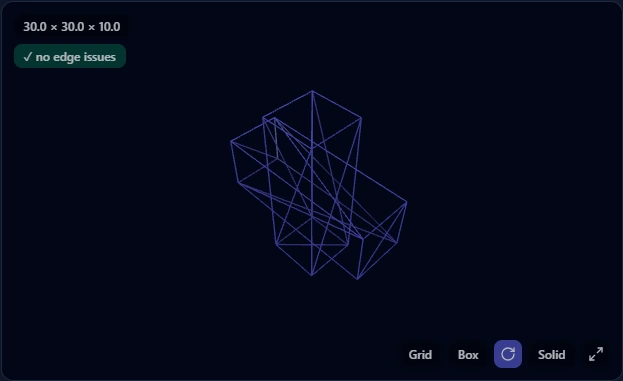
Two solids passing through each other look alarming in a wireframe, but each shell is individually watertight and consistently wound, so the report says printable. This is deliberate honesty rather than a blind spot: modern slicers union overlapping volumes during slicing, so rebuilding the mesh to merge them usually adds risk without adding benefit. If you need a single merged solid for CAD work, that is a boolean union in your modeling tool, not a repair.
Disconnected Shells and Debris
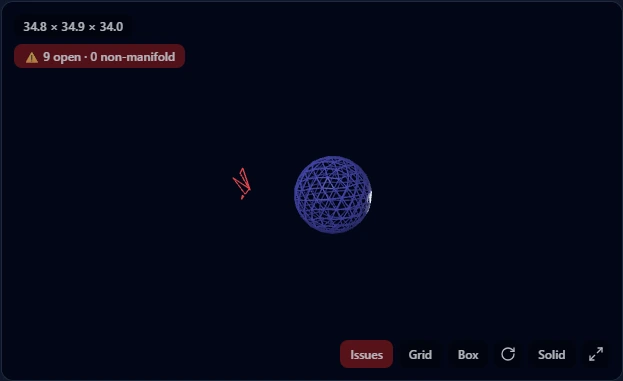
The main body here is fine; the problem is the fragments floating next to it, each too small to be a meaningful solid. The bounding box grows to include them (34.8 units instead of the sphere’s 20), which alone can wreck print placement and scaling. Scans and sloppy merges produce these. Repair drops shells below a size threshold, 1% of surface area by default, and the threshold is adjustable because one person’s debris is another person’s small part.
Combined Damage
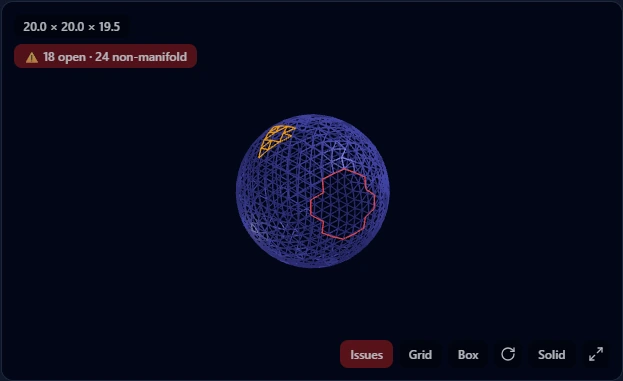
Triangles: 1,244 | Vertices: 627 | Shells: 22
Issues found:
 - not watertight (18 open boundary edges)
 - inconsistent face winding (flipped normals)
 - 24 non-manifold edges
 - 10 duplicate faces
Verdict: NOT PRINT-READY
Real broken files rarely have one polite defect; damage compounds. Here the cheap fixes handle the duplicates and winding first, and surface reconstruction closes what remains. This ordering matters: reconstruction on a mesh still full of duplicate faces produces worse results than reconstruction after cleanup.
Open Surface: The Unfixable One
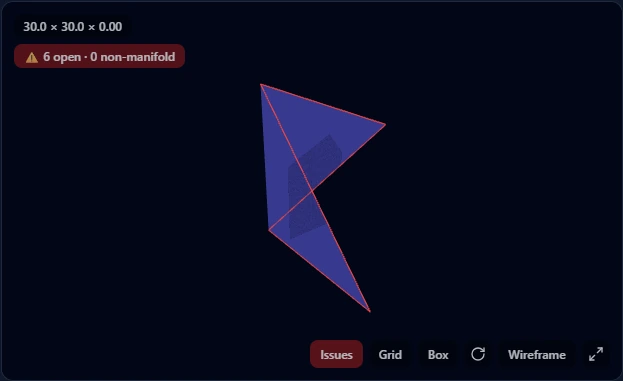
Triangles: 6 | Vertices: 7 | Shells: 1
Dimensions: 30.0 x 30.0 x 0.0 (model units)
Issues found:
 - not watertight (6 open boundary edges)
 ⚠ This file looks like an open surface, not a solid part. Repair can close it, but the result may not be meaningful for printing.
Verdict: NOT PRINT-READY
A sheet with zero thickness has no inside, so there is no solid for a repair algorithm to recover; closing the boundary just creates a zero-volume sliver. That is why the report carries an explicit warning instead of promising a fix. A tool that returns a "repaired" file here without saying this has not repaired anything. The genuine fix is to give the surface thickness in a mesh or CAD editor, a design decision only you can make.
Hairline Cracks
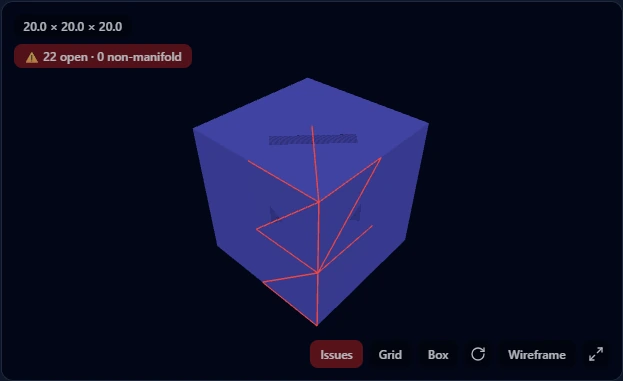
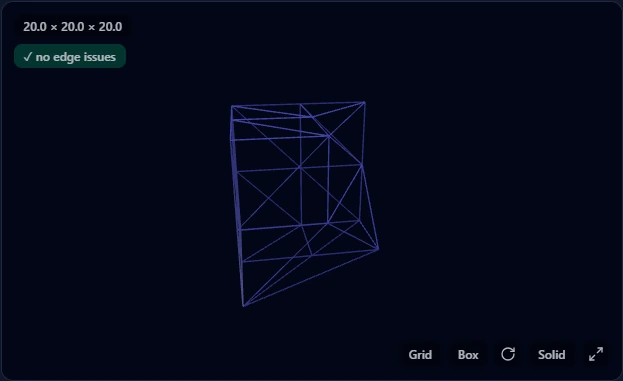
Cracks this thin come from low-tolerance exports, and they are the one defect whose repair genuinely moves geometry: closing a crack means welding vertices across it. On this small test cube the result is clean. On our worst validation case, a badly cracked part lost 23% of its volume to snap-welding, which is why this repair level is opt-in and why the report prints dimensions and volume before and after. If those numbers drift on a part that matters, re-export from the source CAD with tighter tolerance instead.
Check Your Own File
Check mode produces everything shown on this page for your file: the highlighted viewer, the shell and edge counts, the winding check, and the verdict, without modifying the mesh. If the report finds problems, repair is one click away, and the how-to guide below covers choosing repair levels and reading the after-numbers.
Upload an STL or OBJ and get this defect report for your own file, free.
Check Your STLWant the full workflow, tool comparison, and the downloadable broken test files?
How to Repair an STL FileFrequently Asked Questions
What do the red and amber lines in the viewer mean?
Red lines are open boundary edges: edges that belong to only one face, meaning the surface has a gap there. Amber lines are non-manifold edges: edges shared by three or more faces, where the mesh stops being a valid solid boundary. A printable mesh has neither.
Why does the report call the volume "unreliable"?
Mesh volume is computed from the enclosed space, which is only well-defined when the mesh is closed and consistently oriented. On a broken mesh the same computation still returns a number, but it can be wildly wrong; the flipped-normals sphere on this page reports 1360 instead of roughly 4189. Flagging it as unreliable is more honest than printing it as fact.
Why does a mesh with flipped normals show "no edge issues"?
Because it genuinely has none. Edge checks count faces per edge, and flipped normals do not change that count; the defect lives in face orientation, not connectivity. This is why a proper check runs several independent tests, and why a green edge badge alone does not mean printable.
Which of these defects should I fix manually instead?
Open surfaces always: they need a thickness decision no algorithm can make. Self-intersections only if you need a true merged solid rather than a printable file, and that is a boolean union in CAD, not a mesh repair. Everything else on this page is routine automatic repair.
This guide covers one problem. For the full set of 3D converters, checkers, and calculators, visit the hub.
Browse 3D Tools